
2025
Product Design
Arduino
3D
Describe the scope of the project. Why this issue is important, why it matters to so many people, and the solution / impact of the solution.
Challenge
Design an LED equivalent of a rainstick.
What I Did
Built the LED Rain Stick and circuit, wrote all code, programmed via Arduino.
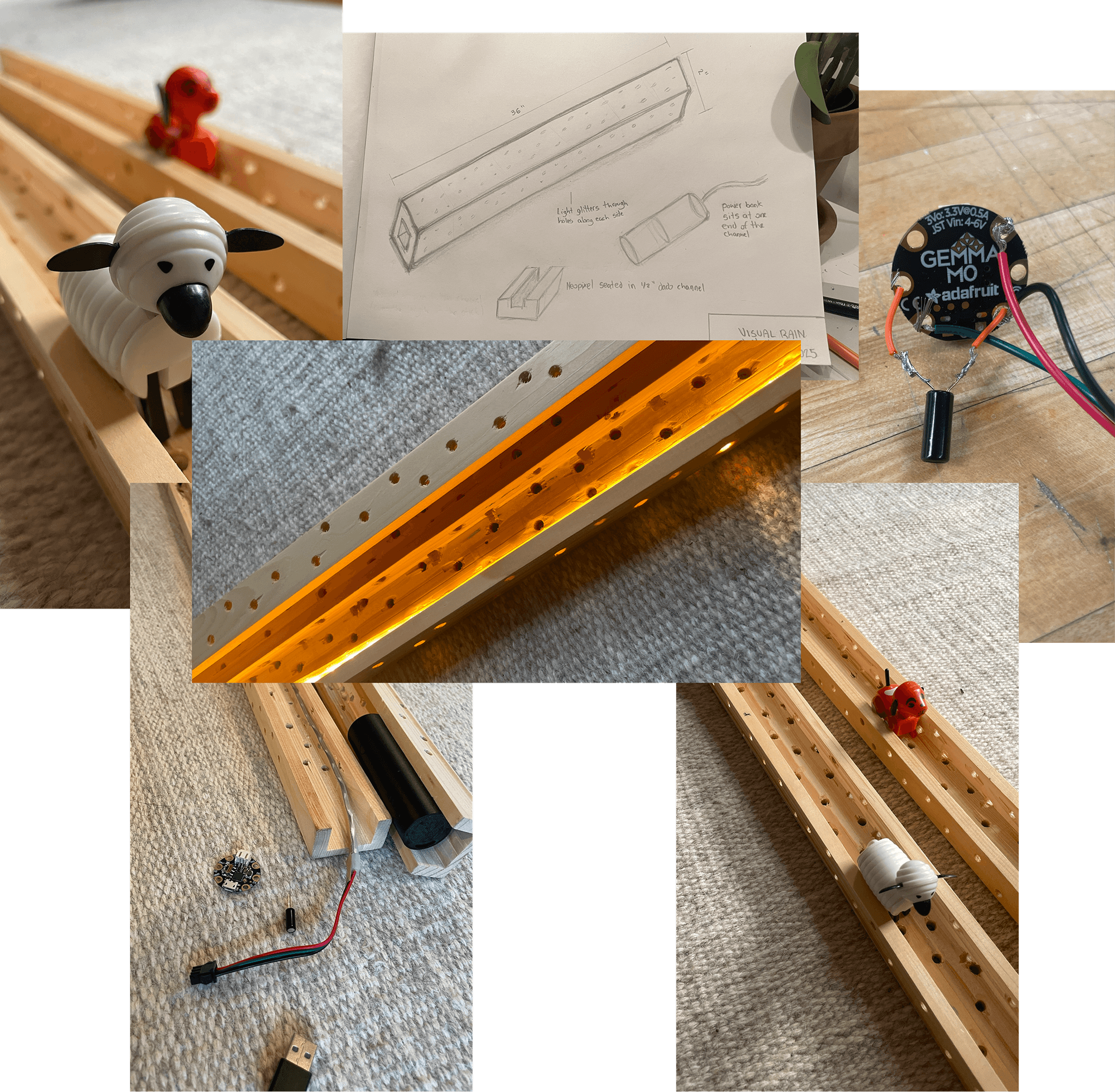
Design
There are two main methods that I used to capture the visual essence of a real rainstick.
To give the lights a "falling" sensation, I coded a colorwipe with a delay—the lights only begin to extinguish after the entire stick is lit. I also wanted to to give the lights a touch of organic unpredictability—like the beads in a real rainstick—by coding a soft sparkle.
It was essential that the trigger for the sequence be a tilting motion. For this I added a tilt ball switch.

// NeoPixel button cycler with tilt ball switch
// Button on pin 4 cycles through animations
// Tilt switch on pin 0 triggers flip animation
#include <Adafruit_NeoPixel.h>
#ifdef __AVR__
#include <avr/power.h>
#endif
#define BUTTON_PIN 4 // Button for cycling animations
#define TILT_PIN 0 // Tilt ball switch - MUST be different from button and pixel pins
#define PIXEL_PIN 2 // Digital IO pin connected to the NeoPixels
#define PIXEL_COUNT 8 // Number of NeoPixels
Adafruit_NeoPixel strip(PIXEL_COUNT, PIXEL_PIN, NEO_GRB + NEO_KHZ800);
boolean oldButtonState = HIGH;
boolean oldTiltState = HIGH;
int mode = 0; // Currently-active animation mode
boolean wipeDirection = true; // true = forward, false = reverse
void setup() {
pinMode(BUTTON_PIN, INPUT_PULLUP);
pinMode(TILT_PIN, INPUT_PULLUP); // Tilt sensor with pullup
strip.begin();
strip.show();
Serial.begin(9600);
}
void loop() {
// Check button for mode cycling
boolean newButtonState = digitalRead(BUTTON_PIN);
if((newButtonState == LOW) && (oldButtonState == HIGH)) {
delay(20); // Debounce
newButtonState = digitalRead(BUTTON_PIN);
if(newButtonState == LOW) {
if(++mode > 1) mode = 0; // Only 2 modes currently
switch(mode) {
case 0:
colorWipe(strip.Color(255, 243, 218), 50);
break;
case 1:
Sparkle(0, 0, 218, 50);
break;
}
}
}
oldButtonState = newButtonState;
// Check tilt switch separately
boolean newTiltState = digitalRead(TILT_PIN);
if(newTiltState != oldTiltState) {
delay(20); // Debounce
newTiltState = digitalRead(TILT_PIN);
if(newTiltState != oldTiltState) {
// Tilt detected - trigger flip animation
Serial.println("TILT DETECTED!");
tiltFlipAnimation();
}
}
oldTiltState = newTiltState;
delay(10);
}
// Special animation when tube is flipped
void tiltFlipAnimation() {
// 5 LEDs per second = 1000ms / 5 = 200ms per LED
int delayTime = 200;
// Color wipe on - chaser effect with warm white
colorWipeDirectional(strip.Color(255, 243, 218), delayTime, wipeDirection);
// Rain sparkle effect while lit
rainSparkle(strip.Color(255, 243, 218), 1000); // Sparkle for 1 second
// Color wipe off - chaser effect turning off (same direction)
colorWipeDirectional(strip.Color(0, 0, 0), delayTime, wipeDirection);
// Reverse direction for next tilt
wipeDirection = !wipeDirection;
}
void colorWipe(uint32_t color, int wait) {
for(int i=0; i<strip.numPixels(); i++) {
strip.setPixelColor(i, color);
strip.show();
delay(wait);
}
}
void colorWipeDirectional(uint32_t color, int wait, boolean forward) {
if(forward) {
// Wipe from start to end
for(int i=0; i<strip.numPixels(); i++) {
strip.setPixelColor(i, color);
strip.show();
delay(wait);
}
} else {
// Wipe from end to start
for(int i=strip.numPixels()-1; i>=0; i--) {
strip.setPixelColor(i, color);
strip.show();
delay(wait);
}
}
}
void Sparkle(byte red, byte green, byte blue, int SpeedDelay) {
int Pixel = random(PIXEL_COUNT);
strip.setPixelColor(Pixel, strip.Color(red, green, blue));
strip.show();
delay(SpeedDelay);
strip.setPixelColor(Pixel, strip.Color(0, 0, 0));
strip.show();
}
void theaterChase(uint32_t color, int wait) {
for(int a=0; a<10; a++) {
for(int b=0; b<3; b++) {
strip.clear();
for(int c=b; c<strip.numPixels(); c += 3) {
strip.setPixelColor(c, color);
}
strip.show();
delay(wait);
}
}
}
void rainbow(int wait) {
for(long firstPixelHue = 0; firstPixelHue < 3*65536; firstPixelHue += 256) {
for(int i=0; i<strip.numPixels(); i++) {
int pixelHue = firstPixelHue + (i * 65536L / strip.numPixels());
strip.setPixelColor(i, strip.gamma32(strip.ColorHSV(pixelHue)));
}
strip.show();
delay(wait);
}
}
void theaterChaseRainbow(int wait) {
int firstPixelHue = 0;
for(int a=0; a<30; a++) {
for(int b=0; b<3; b++) {
strip.clear();
for(int c=b; c<strip.numPixels(); c += 3) {
int hue = firstPixelHue + c * 65536L / strip.numPixels();
uint32_t color = strip.gamma32(strip.ColorHSV(hue));
strip.setPixelColor(c, color);
}
strip.show();
delay(wait);
firstPixelHue += 65536 / 90;
}
}
}
void rainSparkle(uint32_t baseColor, int duration) {
unsigned long startTime = millis();
// First, set all LEDs to base color
for(int i=0; i<strip.numPixels(); i++) {
strip.setPixelColor(i, baseColor);
}
strip.show();
// Sparkle random LEDs white
while(millis() - startTime < duration) {
int pixel = random(strip.numPixels());
// Flash white
strip.setPixelColor(pixel, strip.Color(255, 255, 255));
strip.show();
delay(30);
// Return to base color
strip.setPixelColor(pixel, baseColor);
strip.show();
delay(50);
}
}
Exit Thoughts
The tilt ball switch is quite sensitive, and can be triggered accidentally. Doing this again I would try a digital accelerometer instead.
This was a fun project, and I discovered a joy for soldering in the process. I am working on a second iteration that doesn't use Arduino, to be a plug-in sconce or free-leaning lamp.
TinkerCAD
